 Auto Secure Login
Recover deleted Windows files with a verifiable record
ASL Recovery Center is Windows file recovery software for deleted files, damaged repositories and interrupted AI work. Review the recovery results and verification record before restoring files.
Recover more. Prove every byte.
Get deleted files back on Windows, with a written record proving every byte.
Built for: The person who just emptied the Recycle Bin and realized what was in it · IT technicians and repair-shop staff who recover other people's drives for a living · Developers who lost an afternoon of ChatGPT, Claude, or Codex work when an app crashed · Anyone with a broken commit history, a half-finished rebase, or a repository that will not open
Before you recover deleted Windows files
Protect the source drive. Avoid installing software or saving new files to the drive that lost the data. The detailed recovery workflow below explains why overwritten data may no longer be recoverable.
Choose the recovery workflow. Review Recycle Bin recovery, deep scanning, file carving and AI or Git artifact recovery against what you lost. ASL Recovery Center is a separate product from Microsoft Windows File Recovery.
Review the result before using it. Save recovered output to a different physical drive and read the verification record. A found file is not a guarantee that every byte is intact.
See the existing screenshots, supported surfaces and dated verification results below before choosing a recovery method.
Read the complete workflow · Explore all features · Read the questions and limitations
The problem
ASL Recovery Center exists because of this.
The moment you realize a file is gone, everything you do next either helps or hurts. Most people do the wrong thing first. They keep using the same computer. They install a recovery program onto the very drive that lost the file. They run a repair tool, or a disk check, or they let the machine defragment itself overnight.
Every one of those steps writes new data onto the space where the old file still lives, and once that space is reused the file is not coming back. The window is short and it closes quietly. The tools most people reach for do not help with that.
Free scanners bury you in thousands of unnamed fragments with no way to tell which ones are real. Paid recovery apps front-load a scan and then hold the results behind a checkout page. Almost all of them ask to install onto the drive you are trying to save, and several will happily write recovered files right back onto their own source.
Worse, most of them promise everything. They show a green bar and a big number of found files, and when you pay and open them half are empty or corrupt. Nothing tells you which recovered files are genuinely intact and which are partly overwritten guesses.
Then there is the newer problem nobody built for. A growing share of what people actually lose is not a document in a folder. It is a ChatGPT or Claude conversation that vanished, an editor autosave, a browser store, a cache file, a temporary download, or a Git repository that broke mid-rebase and now refuses to open.
Conventional recovery software has no idea those things exist, so it does not look for them. And if you are a technician, none of this leaves you anything to hand your customer afterwards. You cannot show what you read, what you wrote, where it went, or that you never touched their original drive.
When somebody later asks whether a file was altered, you have nothing but your word.
What changes
- The recovery engines are ours, not a rebranded launcher for somebody else's tool.
- It refuses instead of guessing: partly overwritten ranges are disclosed as gaps, never padded out and presented as intact files.
- Recovered output physically cannot land on the drive it came from, because the check compares real hardware rather than drive letters.
- It looks for what people actually lose now: ChatGPT, Claude, and Codex sessions, editor autosaves, browser and cache stores, and broken Git repositories.
- Git repositories are read without ever running Git, and every recovered object's identity is verified twice.
- Preservation images are verified in a second, fully independent pass, and a resumed copy is re-read against the source rather than trusted from its progress note.
- The main window never runs with administrator rights; a single narrowly defined job is approved, runs, and exits.
What it does
How Windows file recovery works in ASL Recovery Center
ASL Recovery Center is a Windows application that walks you from a small mistake to a serious rescue, using the least invasive tool that can do the job and recording what it did. It installs from the Microsoft Store as a one-time purchase, runs entirely on your own computer, and never uploads a file, asks for an account, or needs an internet connection to recover anything.
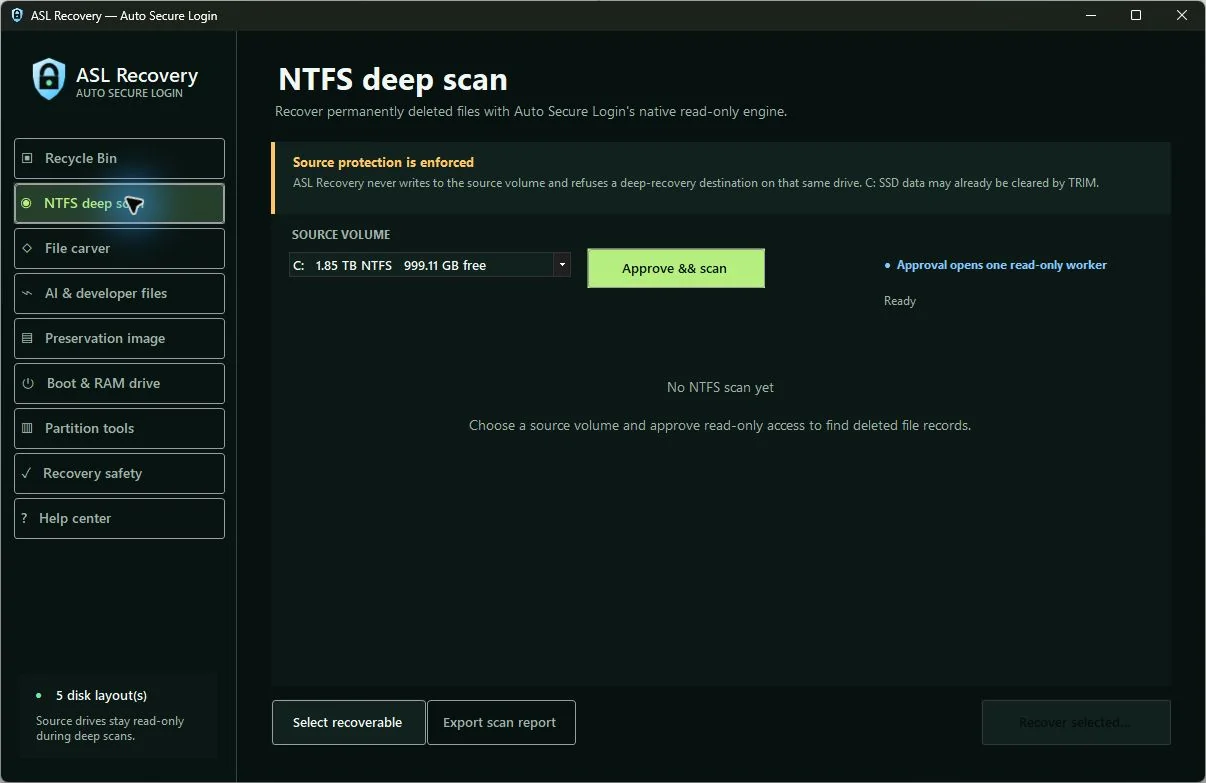
It starts where most losses actually start. Recycle Bin recovery reads the deletion records Windows kept, shows you the original path, the deletion time, and the size, and makes a fresh copy without disturbing the Bin itself. If the file was deleted permanently, the deep scan reads your drive's own file records without writing to it, reconstructs the paths, and checks each recovered piece against what the drive currently has in use.
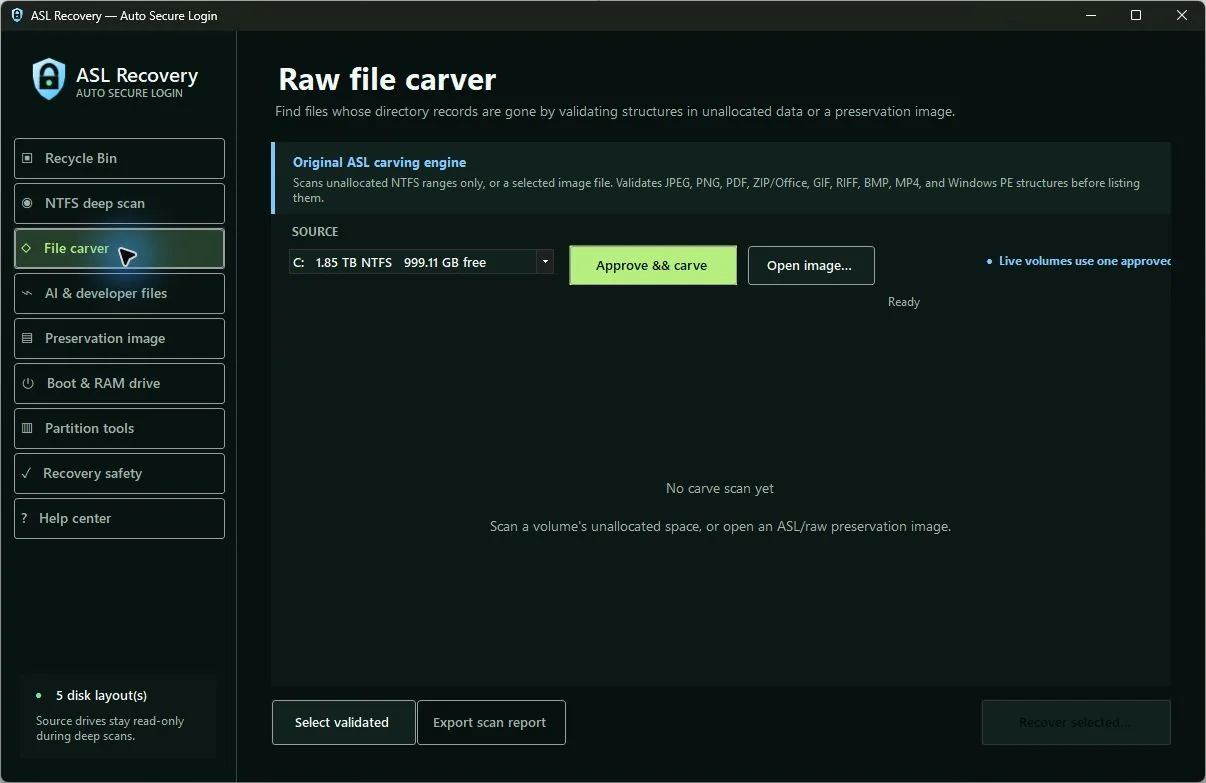
If a chunk of the file now belongs to something else, it says so and shows you the gap instead of quietly handing you a broken file. When the file records themselves are gone, the carver goes looking for the shapes of files in unused space, validating the internal structure of photos, documents, archives, audio, video, and program files rather than trusting a matching first few bytes.
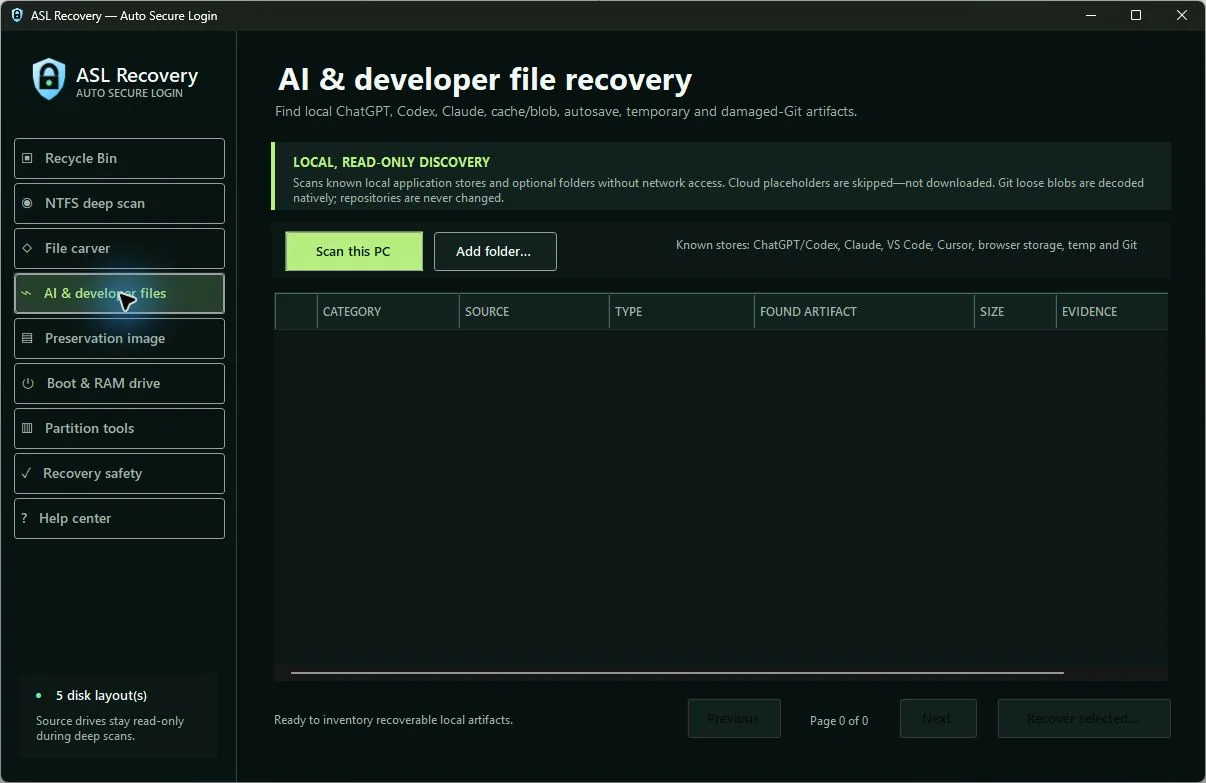
The part no other recovery tool does is the AI and developer sweep. It looks through the local places ChatGPT, Codex, and Claude keep sessions, archived conversations, histories, memories, projects, backups, and desktop data, plus editor histories and autosaves, browser storage, cache and blob stores, temporary files, and interrupted downloads.
It reads Git repositories without ever running Git and without changing them: loose objects are decoded and their identity re-checked against the object's own fingerprint before and after recovery, and reflogs, lost-and-found data, interrupted operations, and old branch tips are all inventoried so a broken repository can be preserved and rebuilt.
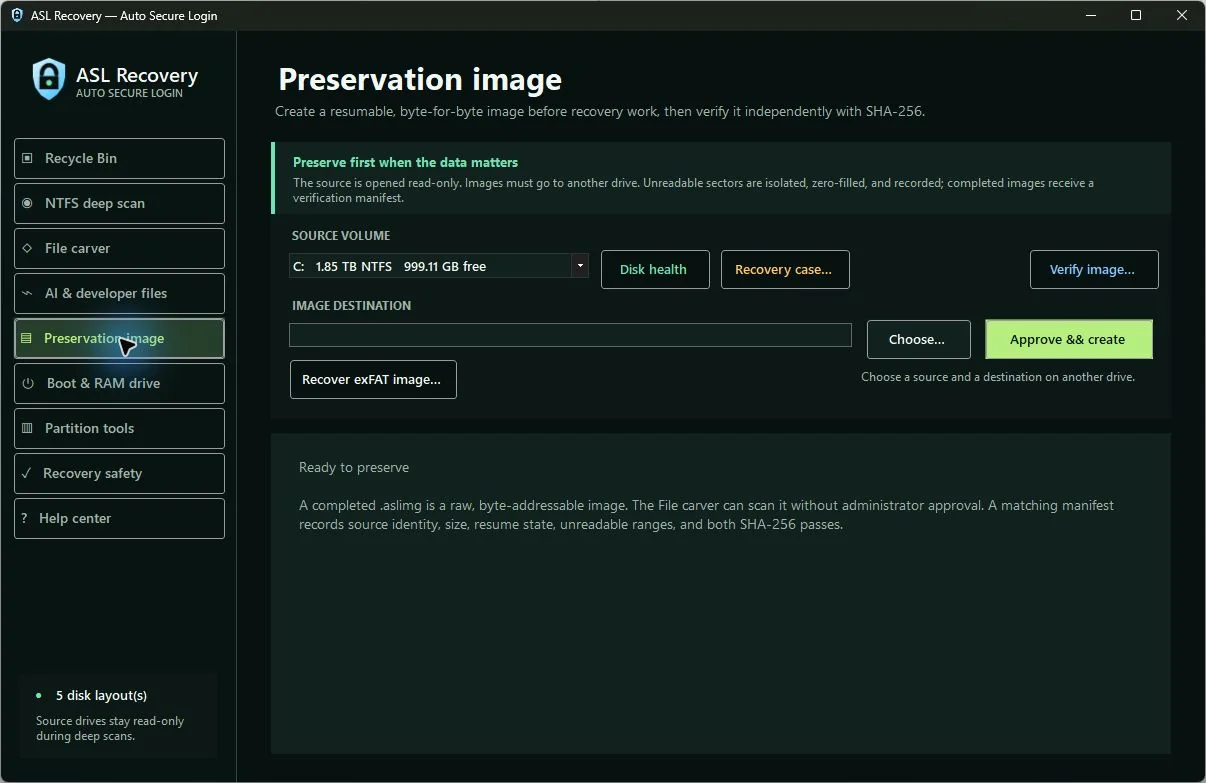
Files that live only in the cloud are skipped rather than silently downloaded. When the drive itself is the problem, you image it first. The preservation imager makes a byte-for-byte copy onto different physical storage, isolates sectors it cannot read instead of stalling on them, checkpoints as it goes so an interrupted copy resumes exactly where it stopped, and re-reads every already-copied byte against the source before resuming rather than trusting the saved progress note.
Every completed image is checksummed during the copy and then verified again in a full independent second pass. From there you can scan the copy as many times as you like while the failing original sits untouched. A recovery case keeps the image, the evidence, and the resume state together so a job that spans days stays traceable across restarts.
Around all of that sits a set of guardrails that behave like part of the engine rather than a warning label. Scans open the source read-only. Recovered output must land on a different physical disk, and the destination picker resolves the actual folder, checks the actual hardware behind it, and refuses cloud-sync folders, network paths, and anything it cannot positively identify.
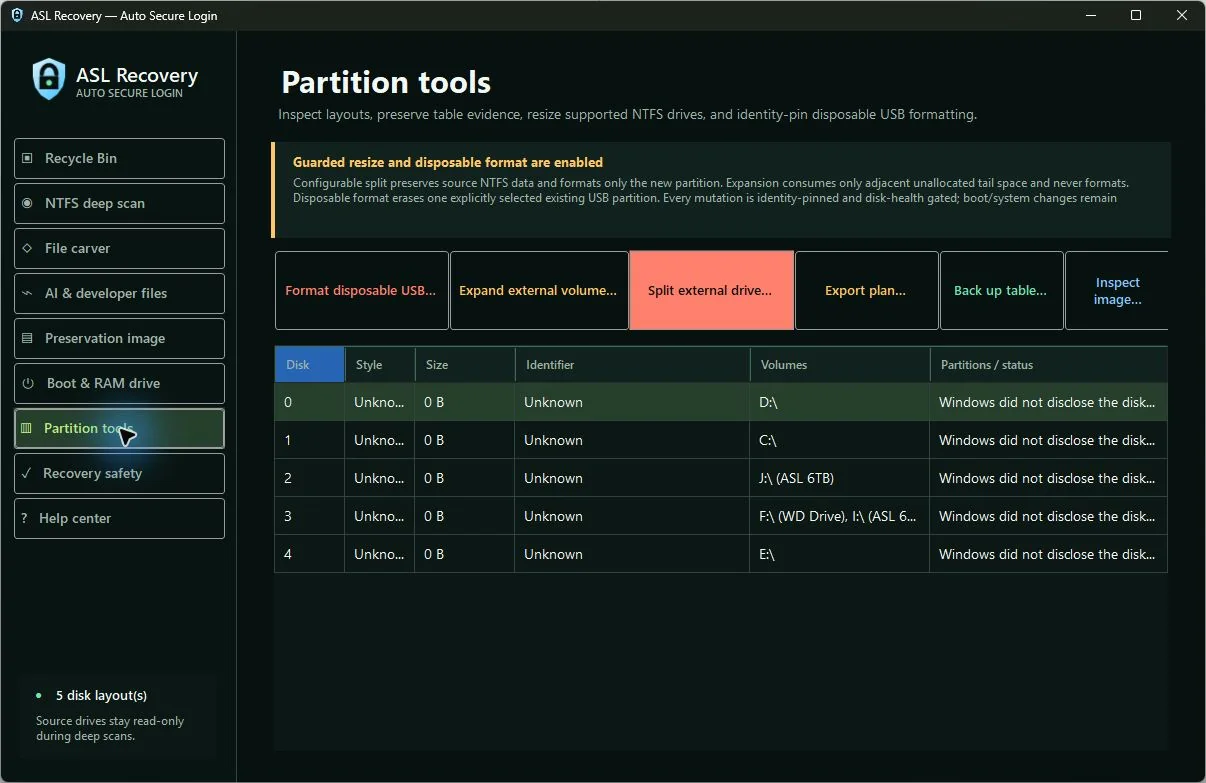
The main window never runs with administrator rights; when a job genuinely needs Windows approval, one narrowly defined operation is approved, runs, and exits. The external-drive tools that can change something (splitting a healthy external drive without touching its files, finishing an interrupted split, extending a drive into free space behind it, or wiping one clearly identified spare USB stick) re-check the exact model, serial, size, layout, and health in the final seconds before they run, require you to type the drive letter and serial back, and write a before-and-after record.
Everything riskier than that is switched off, not hidden behind a setting.
Features
Everything in the current release.
Each of these is built and working today. Nothing on this list is a roadmap item.
Recycle Bin recovery that leaves the Bin alone
Reads the deletion records Windows already kept and pairs them with the file content still on disk. You see the original path, when it was deleted, how big it is, and which drive it came from before you restore anything. The restore makes a new copy with a collision-safe name and leaves the Recycle Bin exactly as it was, so nothing is lost if you change your mind.
Deep recovery for permanently deleted files
When the Bin is empty or was bypassed, the deep scan opens the drive read-only and reads its own file records to find deleted entries, rebuild their paths, and locate their data. Files split across several parts of the disk are reassembled in the right order. If part of a file is now occupied by something else, that range is disclosed as a gap rather than presented as a whole file.
Structure-validated carving for the hard cases
When the file records themselves are gone, the carver scans unused space, or a preservation image, for eleven kinds of file: photos, documents, archives, audio, video, and Windows programs. It checks each candidate's internal structure and length rather than trusting a signature match, and re-checks that the space is still unused right before it recovers. Every recovered file gets a checksum and an entry in the run's record.
ChatGPT, Claude, and Codex recovery
Finds the local places these tools keep sessions, archived conversations, histories, memories, logs, projects, backups, and desktop data. It also covers editor history and backups, browser storage, cache and blob stores, autosaves, temporary fragments, and interrupted downloads. It never touches the network, and anything that exists only in a provider's cloud is skipped rather than downloaded.
Damaged Git repository rescue
Reads a broken repository without running Git and without changing a single file in it. Loose objects are decoded and their identity verified against the object's own fingerprint, once when found and again before the recovered copy is finalized, so a corrupt object cannot be handed back as good. Reflogs, lost-and-found data, interrupted operations, stale branch tips, and packed archives are inventoried and preserved for rebuilding.
Preservation imaging with a real second verification pass
Copies a drive byte for byte onto separate physical storage before you scan it repeatedly. Unreadable sectors are isolated and recorded rather than retried forever, progress is checkpointed so an interrupted copy resumes where it stopped, and every already-copied byte is re-read against the source before resuming instead of trusting the saved note. A finished image is checksummed during the copy and then verified again in a full independent second pass.
Recovery cases that survive a restart
A case keeps the image, the evidence records, the verified checksums, the current stage, and a timestamped trail of what happened in one folder. Updates are written safely so a crash cannot leave a half-written case. Close the app, come back tomorrow, and reopen the job exactly where you left it, which matters when a slow image over a failing drive takes two days.
Storage health check before anything risky
Reads the drive's own health, operating status, and reliability counters wherever the hardware reports them. A critical health state, uncorrected errors, heavy wear, or an unsafe temperature blocks any change to that drive outright and pushes you toward making an image first. It is also honest about its blind spot: many USB enclosures hide these counters, and missing numbers are never treated as proof a drive is fine.
Destination safety that fails closed
Before writing a single recovered file, the app resolves the real folder you picked, identifies the physical hardware behind it, and compares that hardware against every piece of the source. Another letter or another partition on the same physical drive is refused, because that is still writing onto the disk you are trying to save. Cloud-sync folders, network locations, and anything it cannot positively classify are refused rather than assumed safe.
Guarded external-drive split, extend, and wipe
Split a healthy external drive into two without reformatting or losing what is on it; only the newly created space is formatted. Extend a drive into free space directly behind it without formatting at all. Finish a split that was interrupted by a cable pull, without shrinking twice. Each of these re-checks the exact model, serial, unique identifier, size, layout, health, and encryption state immediately before running, and makes you type the drive letter and serial back to confirm.
Offline rescue preparation and a companion console
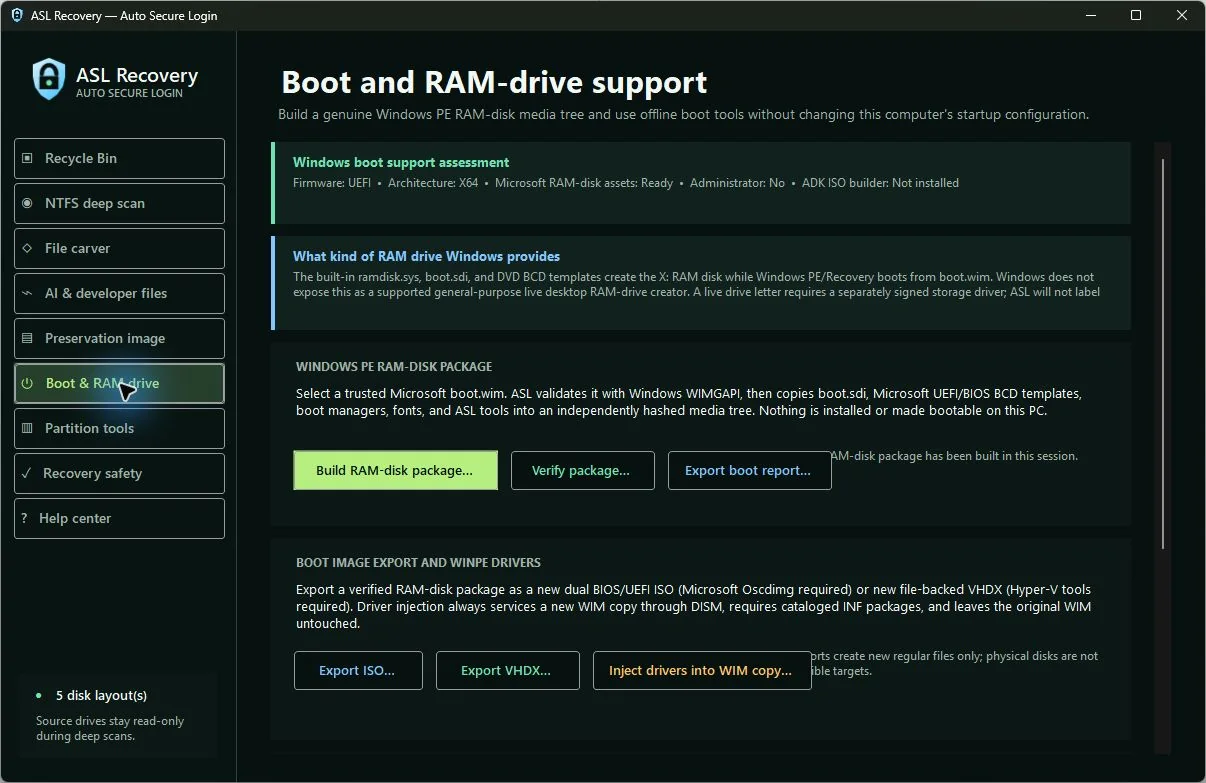
Check whether your PC has what Windows needs for offline recovery, validate a recovery image you supply, assemble and hash a boot-media file tree from Microsoft's own installed components, and stage a verified offline copy of the toolkit. A separate console companion runs in reduced recovery sessions where a normal window will not open. The output is a folder of files, not a formatted or certified-bootable USB stick, and none of this changes your computer's own startup, boot order, firmware, drivers, or recovery partition.
A searchable guide that admits when it does not know
Twenty-six reviewed sections cover choosing the right tool, working from an image, AI and Git artifacts, imaging, offline preparation, drive tools, evidence, and troubleshooting. Search is instant, works with no connection, and cites the exact reviewed section and version behind every answer. When your question is not covered it says so and cites nothing, instead of inventing a recovery procedure that could destroy your data.
Everything on paper, per operation
Recoveries, carving runs, images, and drive operations each produce a machine-readable record: what the source was, what was read, how many bytes came out, which ranges could not be read, where the output went, and its checksum. Drive operations record the exact hardware identity and layout before and after, plus explicit confirmation that nothing was deleted or reinitialized. It is what you hand a customer, an insurer, or your future self.
One purchase, no account, nothing sent anywhere
It is a one-time purchase through the Microsoft Store at $49.99, not a subscription and not a scan-then-pay trap. There is no sign-in inside the app, no recovery cloud, no usage tracking, and no third-party recovery engine underneath; the engines are ours. Recovery works with the network cable unplugged.
Proof
Numbers we can stand behind.
Every figure below comes from the product's own release record or test suite, not from a marketing estimate.
- Drive-changing tools are pinned to one exact physical device by model, serial, unique identifier, size, and layout, re-checked in the final seconds before they run.
- The built-in guide cites a reviewed, versioned section for every answer and abstains when the question is not covered.
- The published limits are as detailed as the feature list, down to naming which capabilities are deliberately not built and dating which test run covers which build.
Where it runs
Surfaces and status.
Status as of 2026-09-02. Independently confirmed on 2026-09-02 against the Microsoft Store catalogue record for product 9NCGSG3Z6NTJ, which returned HTTP 200 with title ASL Recovery Center, publisher ASL LLC, category Security, a release date of 2026-08-25, a last-updated date of 2026-08-28, and a purchasable SKU at $49.99 USD.
The public product page at also returned HTTP 200 on 2026-09-02 with the same $49.99 price and eight application captures. The repository's own 2026-08-28 storefront record states that the already-certified first submission remains live while a listing-only update is reviewed.
Version 1.5.2, with matching store package 1.5.2.0, is recorded in RELEASE-MANIFEST.json. Note that and STORE-SUBMISSION.md still carry stale 2026-08-22 wording describing the app as in certification; the live catalogue record supersedes it.
Works with
Worth more together.
Products on this platform share one sign-in, one support queue, and one engineering standard. These pair naturally with ASL Recovery Center.
ASL Shredder
Recovery Center proves what can be brought back; Shredder proves what cannot. Once you have seen how much survives an ordinary delete, the case for provable destruction on the drives you retire makes itself.
Explore →ASL Files
Recovered files usually need somewhere safe to live and someone to hand them to. Encrypted shared storage with expiring send links beats emailing a customer's rescued data as an attachment.
Explore →ASL Timestamp Anchor
Recovery Center records a checksum for every recovered file. Anchoring those records gives you provable evidence of when the recovery happened, which matters when a dispute surfaces months later.
Explore →ASL Vault
A common bad day starts with a lost drive that also held the only copy of a password or key. Keeping credentials in a purpose-built store means a dead disk costs you files, not access to everything else.
Explore →ASL Support
Recovery jobs raise real questions at awkward hours. The same support front door covers Recovery Center alongside the rest of the platform, so you are not chasing a different contact per product.
Explore →What is new
Recent progress.
This product ships often. The most recent verified changes, newest first.
version 1.5.2 was built with the searchable offline guide, twenty-six reviewed sections with stable citations, catalog fingerprinting, and an explicit abstention when a question is not covered; all fifteen built-in check groups passed and the build produced zero warnings and zero errors.
the phone companion 1.0.0 completed signed-release testing on an Android 16 emulator and a Pixel 8 on Android 14, with encrypted local cases and offline evidence checking; it still has no store record anywhere.
ASL Recovery Center went live on the Microsoft Store at $49.99 as a one-time purchase, store ID 9NCGSG3Z6NTJ.
the public product page was rebuilt with eight genuine captures of the running application, honest limits, and pre-purchase questions, and a listing-only update was submitted to the Store the same day while the already-certified release stayed live; the Store record shows a last-updated date of 2026-08-28.
That screenshot pass also surfaced and fixed a responsiveness defect where the offline-preparation page could appear to hang while searching for optional Windows components; the corrected build opens that page in about 170 ms, and that fix is in the source but has not yet shipped inside a released package.
Pricing
USD $49.99, one-time purchase through the Microsoft Store, confirmed against the live Store record on 2026-09-02. No subscription and no in-app purchase. No technician, site, or multi-machine licence is published. The phone companion is intended as a separate one-time USD $9.99 app but is not published and has no store record.
Open ASL Recovery Center →Questions buyers ask
Windows file recovery questions
Is $49.99 really it, or does it become a subscription later?
It is a single one-time purchase through the Microsoft Store. There is no subscription, no in-app purchase, no per-drive fee, and no scan-then-pay wall; every scan and every recovery works from the moment it installs. Microsoft handles the purchase and updates.
What happens if I stop paying?
There is nothing to stop paying. You bought the app once and it keeps working, including with no internet connection. Nothing you recovered lives on our servers, so nothing gets locked, expired, or held back later. Your recovered files and evidence records are ordinary files in folders you chose.
We already use a free recovery tool. Why switch?
Free tools are fine for a Recycle Bin mistake. The difference shows up in the hard cases: whether the tool tells you a file is partly overwritten instead of handing you a corrupt copy, whether it physically refuses to write recovered data back onto the drive you are saving, whether it can image an unstable drive and resume when the cable slips, and whether it finds AI sessions and broken Git repositories at all. If you also need to show someone what happened, most free tools leave you with nothing on paper.
Do my files get uploaded anywhere?
No. Every recovery engine runs on your own computer. There is no account inside the app, no recovery cloud, no usage tracking, and no connection needed to scan or recover. The AI and developer sweep looks only at local storage and deliberately skips files that exist only in a cloud provider, so it cannot accidentally pull private content down.
Is it safe to run on a drive that is already failing?
Running any scan repeatedly against a failing drive is the risk, which is why the recommended path is to image it first. The imager reads the source read-only, isolates sectors it cannot read instead of hammering them, and checkpoints so an interrupted copy resumes. Then you scan the copy as often as you want while the original sits untouched. The health check will also block drive-changing operations outright on a disk reporting critical errors.
Is it ready, or should I wait?
It is published on the Microsoft Store and you can buy and install it today; it went on sale on 2026-08-25. The released package passed Microsoft's own certification kit with 23 tests passed and zero mandatory failures, and it built with zero warnings and zero errors.
Its 15 built-in check groups all passed on 2026-08-20. An earlier build passed 59 of 59 required checks in a sealed test machine on 2026-08-13; that run predates this package, and we say so rather than quietly borrowing the number.
The published limits list is deliberately long, so you know before buying exactly what it does and does not do.
Can it really get my ChatGPT or Claude conversations back?
It can recover the local files those tools left on your machine: sessions, archived conversations, histories, memories, projects, backups, desktop data, and the caches around them, along with editor autosaves and browser storage. What it cannot do is reach into a provider's cloud and pull down a conversation that only ever existed there. If the local copy was overwritten, it is gone like any other file.
Will the drive tools wreck the wrong disk?
That is the failure mode the design is built around. Every operation that can change a drive re-checks the exact model, serial, unique identifier, size, partition layout, health, and encryption state in the final seconds before it runs, requires you to type the drive letter and serial back, and protects a separately chosen drive as off-limits.
Splitting keeps your files and formats only the newly created space. Wiping is limited to one clearly identified spare USB stick. Deleting partitions, reinitializing disks, restoring partition tables, and resizing your system drive are switched off, not tucked away in a menu. One honest caveat: these engines were proven in a sealed test machine on disposable virtual drives, and our physical-drive evidence is from an earlier version of them, so treat any drive you cannot afford to lose as worth imaging first.
Is there anything to migrate or set up?
No. There is no server to stand up, no data to import, no account to create, and nothing to connect. Install it, plug in a second drive to receive recovered files, and start. The only real setup requirement is somewhere separate to write to, because it will refuse to save recovered files back onto the drive they came from.
Does it change my computer's startup or install drivers?
No. The offline preparation tools build new files and folders. Your computer's boot settings, boot order, firmware, recovery partition, and installed drivers are not modified, and nothing in the product restarts your machine. Driver work happens on a copy of a recovery image you supply, never on your live system. What it produces is a folder of files; turning that into media that actually boots your hardware is your step, and we have not certified it.
Do I need to be an expert to use it?
No, but it does not pretend the decisions are trivial. The interface orders the tools from least invasive to most, and the built-in guide has twenty-six reviewed sections you can search with no connection, each of which cites its source and links straight to the matching tool. When your question is not covered, it says so rather than inventing a procedure, which matters when a wrong step is permanent.
I run a repair shop. Can I use this on customer drives?
That is one of the main uses. Each recovery, image, and drive operation produces a machine-readable record of the source, what was read, how many bytes came out, what could not be read, where the output went, and its checksum, which is what you give the customer. Recovery cases keep a multi-day job together across restarts. Note that it is sold per machine as a one-time purchase; there is no separate technician licence published today, so ask support if you need several workstations covered.
What should I know before I rely on it?
We would rather you hear this from us than discover it later. As of 2026-09-02:
- Nothing recovers overwritten data. If the space a file occupied has been reused, that data is gone, and no product can change that.
- On most modern solid-state drives, deletion triggers an internal clear that discards the data almost immediately, so recovery after a delete is often impossible. The app tells you that rather than selling you hope.
- It does not bypass BitLocker or any other encryption. Without the key, encrypted data stays encrypted.
- It does not rebuild RAID arrays, recover ReFS volumes, or repair a damaged filesystem. Those are separate problems needing separate tools.
- Compressed, encrypted, and certain complex file layouts are refused by the deep scan rather than partly recovered and presented as complete.
- Carving recovers files stored in one continuous run. A heavily fragmented file with no surviving records is reported but not reconstructed.
- Recovery from exFAT drives currently covers deleted files stored in one continuous run whose space is still unused. Fragmented exFAT files are reported and refused.
- Packed Git archives are validated and preserved as files, but individual objects inside them are not unpacked in this version.
- A confidence score describes how good the evidence for a recovered file is. It is not a promise that the contents are complete or make sense when opened.
- The drive-changing tools work only on healthy external USB drives. Internal drives, system drives, multi-partition disks, and drives reporting errors are refused by design.
Recover more. Prove every byte.
Get deleted files back on Windows, with a written record proving every byte.
Prefer email? contact@autosecurelogin.com
Practical reading
Windows File Recovery: Workflow, Options and Limits
Plan a Windows file recovery attempt, compare ASL Recovery Center’s published workflow with Microsoft’s utility, and understand what recovery cannot promise.