Auto Secure Login

ASL AI Hub Master Suite · Native Windows

Put your computers to work together.

Reviewed workflows, GPU and CPU resource hosting, verified file delivery and PC diagnostics—in one application.

Keep the laptop you use every day as your workspace. Give compatible tasks to the computer with the right resources, even when your machines are on different networks. See what is running, why it is running, and where the result was delivered.

Four useful products. One connected approach.

PC Steward · $49.99

Understand this computer's performance, storage, processes and recorded problems. Expand dated evidence and review a specific next step. Useful without a fleet.

PC Steward in the Microsoft Store · Steward guide

Existing Store release; no new package replaced it during this final submission.

rBroker · $49.99

Run local resource services, identify GPU lease and CPU worker ownership, join a configurable fleet and execute explicitly permitted work. More than a monitor.

rBroker in the Microsoft Store · rBroker guide

Final 1.3.0.0 package is in Microsoft certification.

AI Hub Companion · Free

Connect supported official AI clients and build reviewed, readable fleet workflows. Nodes retain the final admission decision.

Companion in the Microsoft Store · AI Hub desktop guide

Available in the Microsoft Store; the public download was verified September 14, 2026. The desktop download is free; ASL-hosted service subscriptions and provider accounts or usage are separate.

Master Suite · $90.00

The shared native workspaces in one application, with its own bundled engines and separate profiles. No purchase or installation of the other three apps is required.

Master Suite in the Microsoft Store · Suite guide

One application for the combined experience. The standalone products remain independently useful.

From a described task to a verified result

Describe and approve the work

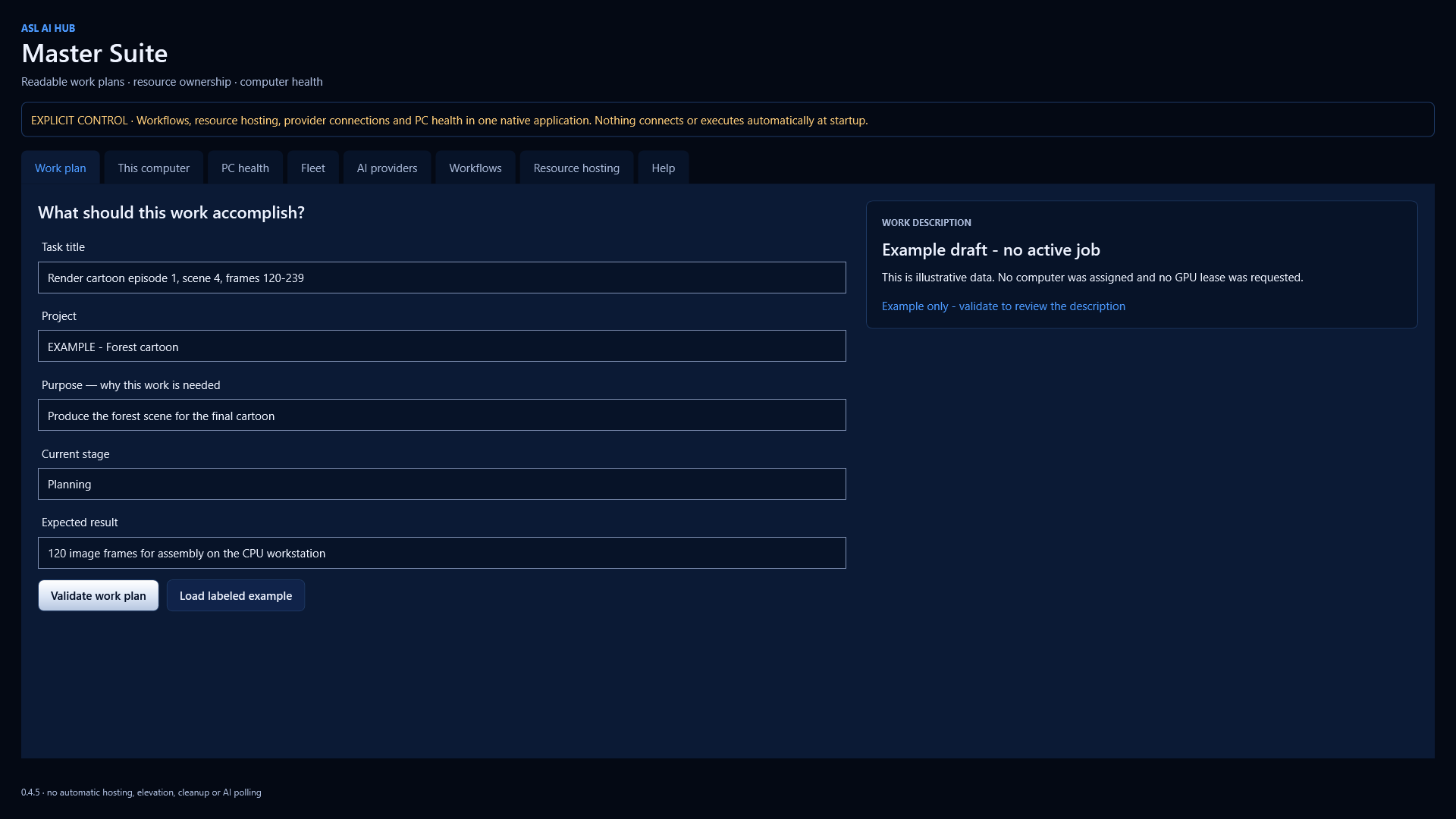
Every step carries a title, project, purpose, stage and expected result—not just a session number. Select a compatible node and registered handler, resource needs and dependencies. Approve the exact saved plan before advancing it.

Keep each computer in control

Joining recognizes a node; it does not authorize remote execution. Separate dispatcher permissions, local consent and CPU/RAM/GPU limits determine what it may accept. Existing resource authorities are not silently replaced.

Recover without guessing

Resumable scoped transfers reuse confirmed chunks. Unknown outcomes are reconciled against the original job and attempt. A completed render and a delivered file are separate states; check the final receipt.

Understand the machine

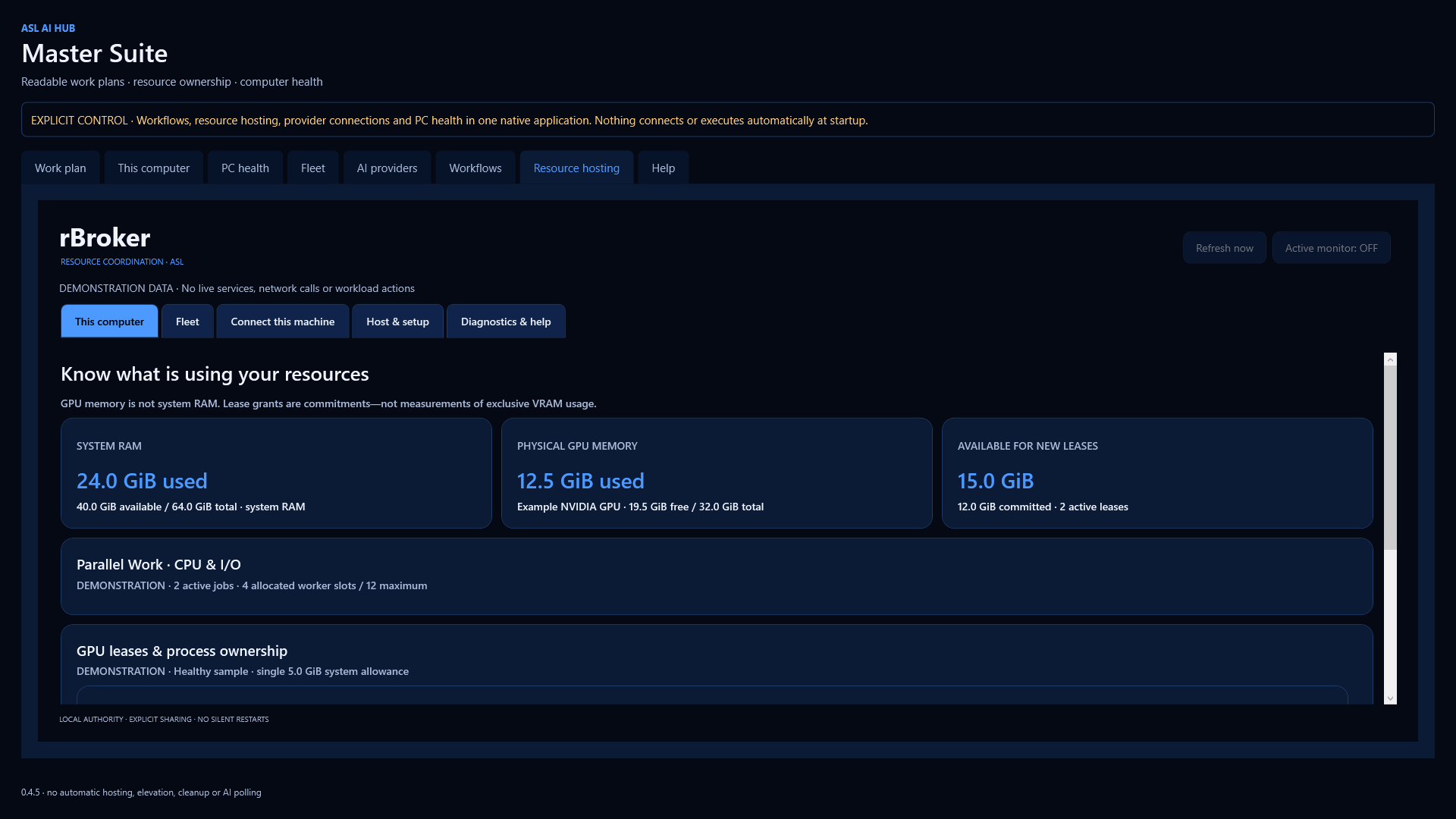
Read local health evidence and optional fleet observations with sample times. System RAM, physical GPU memory and leased commitments stay distinct. Old incidents remain visible without falsely declaring a current emergency.

See the work. Understand the resources.

These are actual native Master Suite 0.4.5 screens. The task and resource values are clearly labeled demonstration examples, not customer data or active jobs.

Master Suite work plan with a descriptive cartoon scene title, project, purpose, stage and expected output
Describe the intended result before approving a workflow. A sample draft does not start work.
Master Suite resource workspace showing separate system RAM, physical GPU memory, lease commitments and Parallel Work worker counts
One native resource workspace, with separate RAM and GPU accounting and explicit hosting controls.

A practical media workflow

A CPU/RAM-rich node can prepare scene data, a compatible GPU node can perform supported media work, and the result can be verified and delivered to the chosen laptop folder. Current reviewed handlers cover bounded JSON work, file verification and the supported shape-animation/media path.

This is not unrestricted remote shell access or a promise that any cartoon, video game, model or creative application can be distributed automatically. Models, encoders and creative tools need their own supported configuration and licenses. A successful technical render does not establish artistic quality.

What you need

  • Master Suite: x64 Windows 11 build 22621 or later. The standalone apps have their own compatibility declarations.
  • Across networks: an operator-provided HTTPS coordinator that participating nodes can reach. Its address is configurable; it need not be an ASL domain.
  • Local GPU admission: supported NVIDIA hardware and an installed driver. GPU-free machines can still perform supported CPU and memory work.
  • Background operation: an optional, separately approved Windows service installation. Installing the Store app alone starts no service or remote executor.
  • Linux nodes are headless, using the portable contracts and outbound HTTPS. macOS hardware acceptance is not yet claimed.

Your data and your choices

Suite keeps its own profiles rather than copying another app's credentials. Fleet status, task payloads and file transfers have different disclosure scopes. Review the node permissions, selected files and coordinator operator's policy. Read the Suite privacy and data-handling notice.

Setup help and support

The complete help center covers all four products, joining, permissions, resources, workflows, delivery, recovery, services, diagnostics and costs. It is also included offline in the native application.

Open the Master Suite help center

Email support@autosecurelogin.com with the app version, exact error time and non-sensitive reproduction steps. Never send keys or unreviewed customer files.

Help / Ayuda